
Lists and Advanced Filters
Lists use progressive disclosure: Quick Query + Applied Summary + Advanced Filter + Saved View. The first screen preserves results, current query context, and the primary action without permanently exposing every field.
List Recipe
Page Header -> Query Toolbar -> Applied Summary -> Data Toolbar -> Server Data Table -> Pagination -> Selection Action Bar when rows are selectedPage Header and Query Toolbar form one continuous work surface, not two large floating cards.
Three complexity levels
| Level | Trigger | Default presentation |
|---|---|---|
| Simple | One to four ordinary fields | All in Quick Query |
| Structured | Five to twelve fields | Two to four frequent fields plus a 400–480px sheet |
| Expert | Thirteen or more, OR/AND, cross-entity, or shared logic | Quick Query plus a 560–720px Query Studio |
Count is not the only trigger. Grouping, OR, nesting, cross-entity conditions, or controlled sharing move the task to Expert.
Quick Query
- Keep one main keyword input and at most three frequent structured fields on one row.
- Move lower-frequency fields into Advanced Filter when space narrows.
- Show the number of hidden applied conditions on the Advanced Filter button.
- Server queries use explicit Apply by default; lightweight suggestions may debounce.
- Reference pickers search inside their own popovers.
Applied Summary
After applying complex conditions, the result area explains why each row is present. Display up to three or four removable chips and collapse the remainder into a counted summary.
Keep the summary when results are empty. Clear All removes current conditions but never deletes the Saved View definition.
Advanced Filter and Query Studio
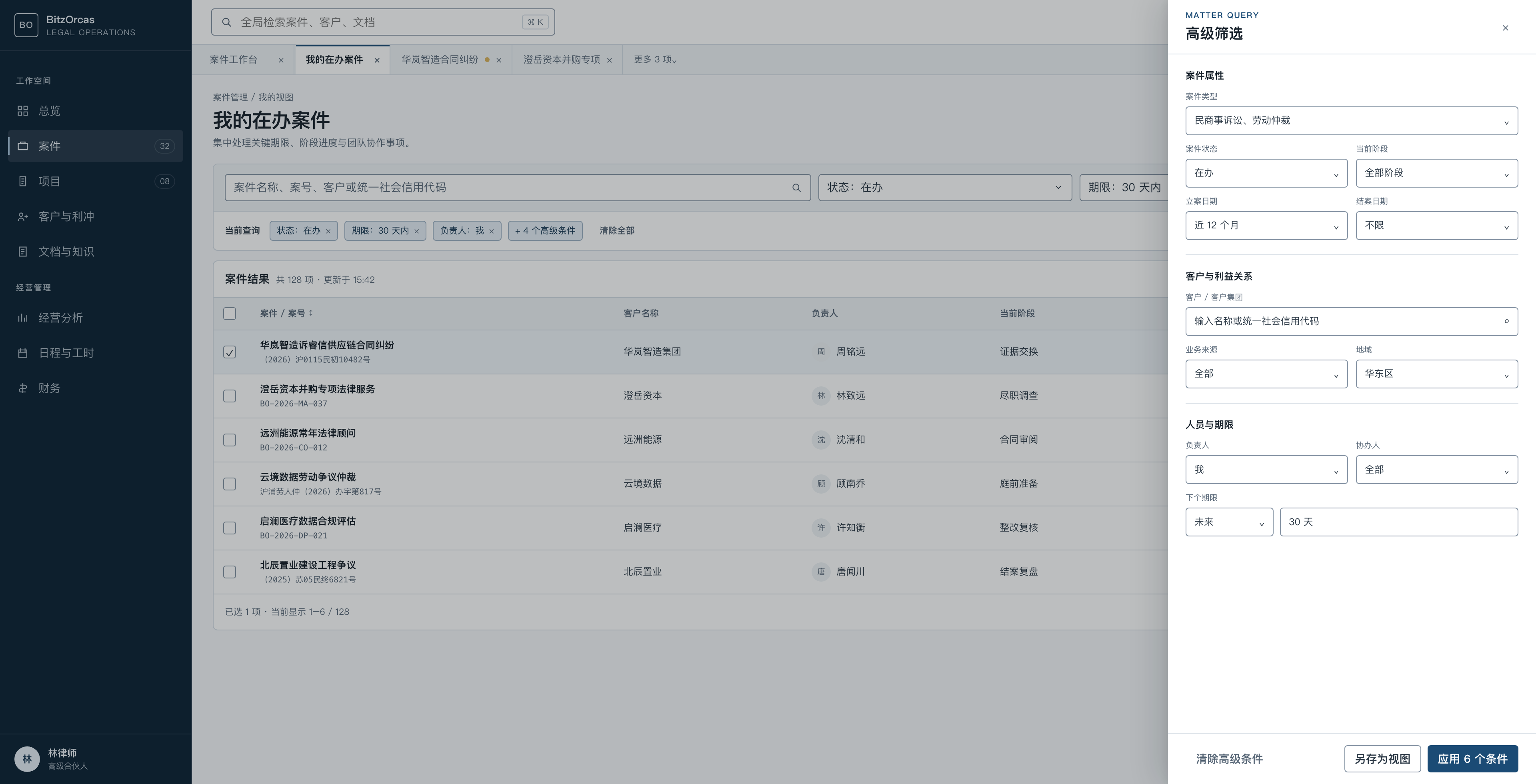
Structured mode uses a right sheet with a stable header, grouped body, and fixed footer. Closing unapplied edits must not silently change the result.
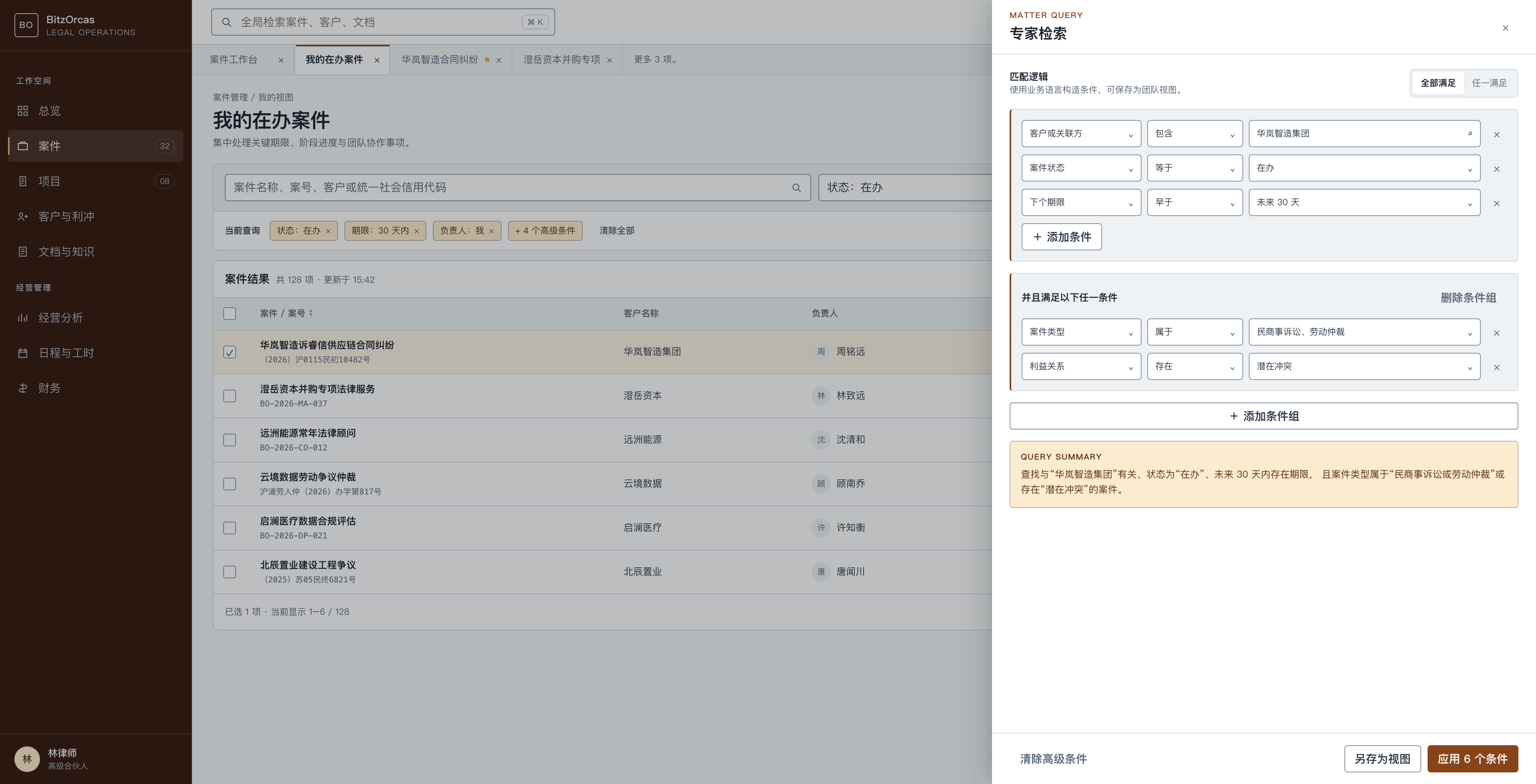
Expert mode supports a clear first-level All/Any grouping, field/operator/value rows, a natural-language summary, and separate Save and Apply actions.
Saved View
A Saved View stores query, sort, visible columns, and optional density. It never stores a screenshot or authorization facts.
- Product defaults cannot be overwritten by ordinary users.
- Personal views can be copied, renamed, and selected as a personal default.
- Team views require permission and an owner.
- The URL represents the current non-sensitive query.
- Tenant changes never reuse query state that can leak data scope.
Data Table
| Property | Dense | Compact | Comfortable | Spacious |
|---|---|---|---|---|
| Single-line row | 28px | 36px | 48px | 52px |
| Two-line row | 40px | 48px | 60px | 64px |
| Horizontal padding | 6px | 12px | 16px | 20px |
| Vertical padding | 2px | 6px | 10px | 12px |
| Header | 28px | 36px | 44px | 52px |
| Control font size | 13px | 14px | 14px | 16px |
Use tabular numbers for money and dates. Combine text with shape or icon for status. Show horizontal overflow and selected-row actions explicitly.
Implementation covers Loading, Empty, Filter-empty, Error, Unauthorized, and Stale states.
URL and recovery states
Stable, non-sensitive filters belong in the URL so refresh, Back, Forward, and a copied link restore the same query context:
/matters?view=my-active&status=open&owner=me&deadline=30d&sort=deadline.asc- Loading keeps the table structure stable while the request is in flight.
- Empty means that the business collection has no records yet.
- Filter-empty preserves the applied summary and exposes a quick clear action.
- Error preserves the current query and offers retry without resetting it.
- Unauthorized replaces protected content and never exposes cached rows.
- Stale identifies retained data while a background refresh is recovering.