
In large-scale enterprise Domain-Driven Design (DDD) and Clean Architecture projects, engineering teams often struggle between two extremes:
- Mechanical Scaffold Friction: Implementing a business aggregate with state machines and tenant isolation requires developers to manually author over a dozen boilerplate files across
Domain(Aggregate Roots, Enums, Invariants),Contracts(CQRS Commands, Queries, DTOs),Application(Command Handlers, Validators), andInfrastructure(Persistence Models, EF Core / SqlSugar Mappings, Repositories). A single navigation property misconfiguration or foreign key naming mismatch is often delayed until integration tests or database migrations crash; - Loss of Control in Heavy Low-Code Platforms: Many proprietary tools attempting to eliminate boilerplate rely on opaque code generators, producing tightly coupled glue code that strips senior engineers of fine-grained control over core domain models and physical SQL execution plans.
BitzOrcas Suite (launched via bitz suite or bitz suite --web) is a lightweight, local visual architecture studio built for enterprise microkernel architecture development. Rather than acting as a black-box replacement for code, it functions as an Architecture Co-Pilot: assembling domain models in memory, rendering real-time Virtual File System (VFS) code diffs, visually verifying entity topologies and SQL Server / PostgreSQL DDL scripts, and atomically writing them to the physical solution upon developer review.
Architecture & IPC Communication Mechanism
BitzOrcas Suite deliberately rejects heavy Electron shells that incur hundreds of megabytes of runtime overhead, opting instead for an embedded microkernel architecture with zero external dependencies:
Key Engineering Trade-offs
- Zero Installation Footprint vs. Rich Interactivity:
The Single Page Application (SPA) is pre-bundled during compilation into highly compressed static assets and embedded directly into
BitzOrcas.Cli.dllvia<EmbeddedResource>. Developers need no Node.js, npm, or external runtimes; - Loopback Isolation & Dynamic Token Handshake:
The local HTTP server strictly binds to
127.0.0.1and rejects external network requests. Each launch generates a cryptographically random single-use security token (?token=<one-time-token>), preventing malicious local processes from port-sniffing or tampering with source code; - In-Memory VFS Dirty-Write Guard: All entity modeling and slice generation occurs within an in-memory Virtual File System (VFS), backed by Roslyn syntax analyzers for real-time validation. Until atomic confirmation is given, zero bytes touch the physical disk, guaranteeing clean Git workspaces.
Core Studio Feature Deep-Dive
1. Entity Modeling & Property Grid Designer
The workbench provides an enterprise-grade entity designer supporting property definitions, C# strong types, nullability indicators, length constraints, precision/scale, and business descriptions:
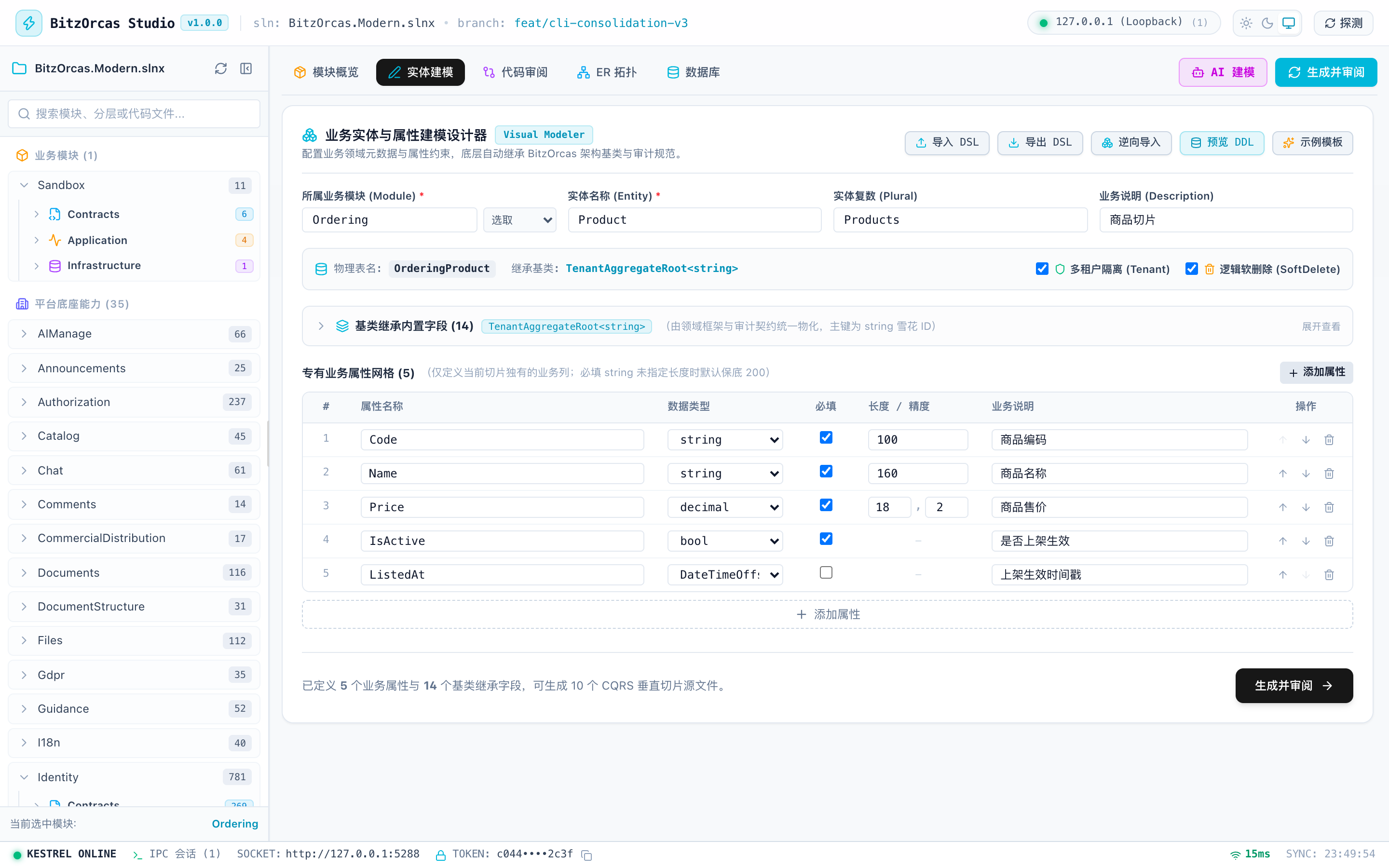
Core Capabilities
- Type Inference & Constraint Auto-fill: Selecting
stringautomatically enables max length inputs; selectingdecimalactivates precision and scale validators; - Architectural Trait Toggles: One-click configuration of Multi-Tenant isolation (
TenantAggregateRoot<T>) and Soft Deletion (ISoftDelete); - Snowflake Primary Key Strategy: Enforces Twitter Snowflake distributed incrementing primary keys (
longorstring), avoiding single-database auto-increment bottlenecks in sharded environments.
2. In-Memory Slice Generation & Monaco Diff Reviewer
After defining properties in the designer, clicking “Generate & Review” switches to the code review perspective. Suite invokes the Scriban template engine to construct the full slice in memory and renders double-column diffs against physical files:
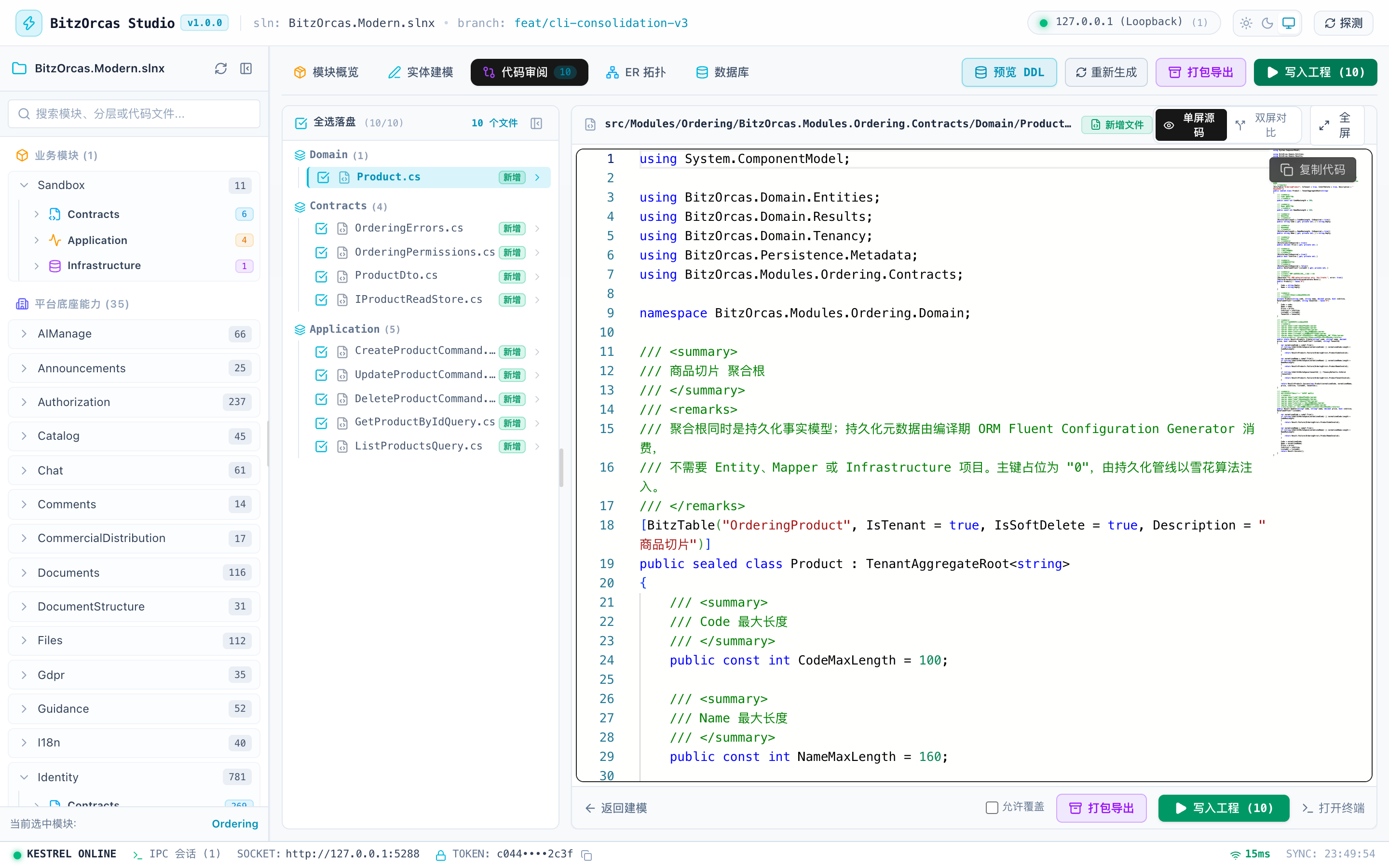
Review Window Features
- Intelligent Single/Double Pane Routing: Brand-new files render in a focused Monaco syntax viewer; modified existing files automatically route into a side-by-side Monaco Diff viewer;
- Fullscreen Immersive Mode: Maximizes into a full-screen layout with the slice tree and code viewer aligned horizontally, exitable via the
Esckey; - Atomic Confirmation Safeguard: Before disk persistence, a confirmation modal displays the list of affected files and change types, requiring explicit authorization to prevent accidental overwrites.
3. Multi-Dialect DDL Preview & ORM Migration Code Generation
Database foundation stability governs production reliability. Suite includes a production-grade DDL migration generator supporting multiple database engines:
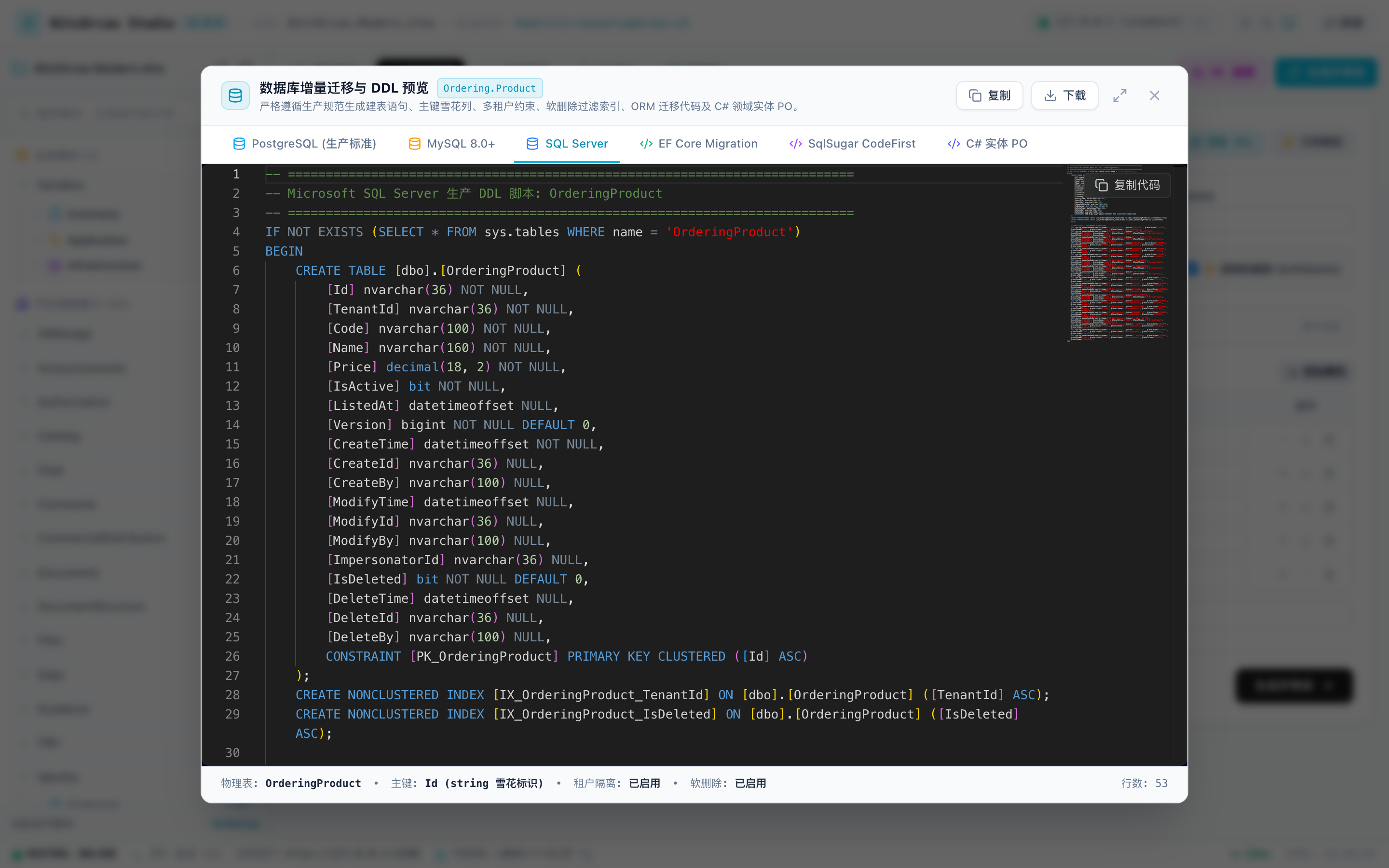
Migration Script Features
- Comprehensive SQL Server Documentation: Uses
sys.sp_addextendedpropertystored procedures to attach descriptions to tables, snowflake primary keys, tenant columns, audit fields (CreatedAt,CreatedBy), and business columns; - Multi-Database Dialect Support: Instantly toggles between PostgreSQL (with
COMMENT ON COLUMNand partial soft-delete indices), MySQL 8.0+, and SQL Server DDL; - Dual ORM Parity: Simultaneously outputs EF Core
IEntityTypeConfiguration<T>and SqlSugar entity mapping configurations from unified[BitzTable]and[BitzColumn]metadata, preventing ORM configuration drift; - Industrial Modal Controls: Supports draggable header positioning across the viewport and double-click or button maximization for comfortable long-script inspection.
4. Domain Entity Relationship Topology (ER Diagram)
Suite parses all aggregate roots and entities across the selected module, dynamically mapping foreign keys and architectural dependencies:
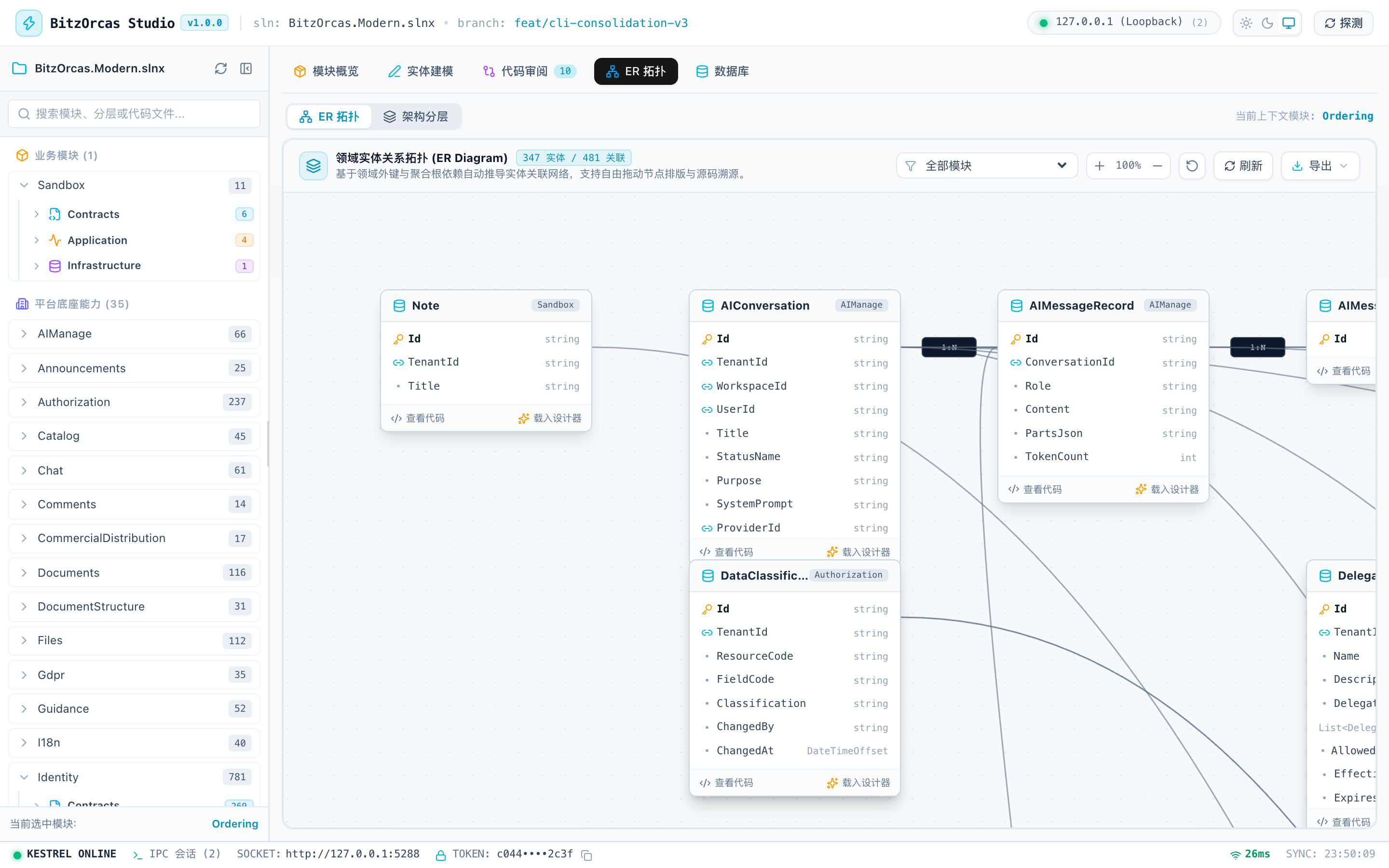
Interactive & Export Capabilities
- Cursor-Anchored Smooth Zoom (Zoom-towards-cursor): Wheel zooming automatically compensates for viewport offsets, keeping the cursor anchor stable and eliminating jumpy scaling;
- Multi-Format Export:
- Retina 2x PNG: Computes bounding boxes across nodes and curves, exporting via offscreen Canvas supersampling;
- W3C Standard SVG: Exports standalone vector graphics ready for architecture reports or Wiki pages;
- Mermaid Script Copy: Copies standard Mermaid
erDiagramsyntax directly to the clipboard.
5. Git Commit Timeline & Multi-Dimensional Search
In the “Module Overview” perspective, Suite provides high-density commit tracking inspired by JetBrains Rider and GitKraken:
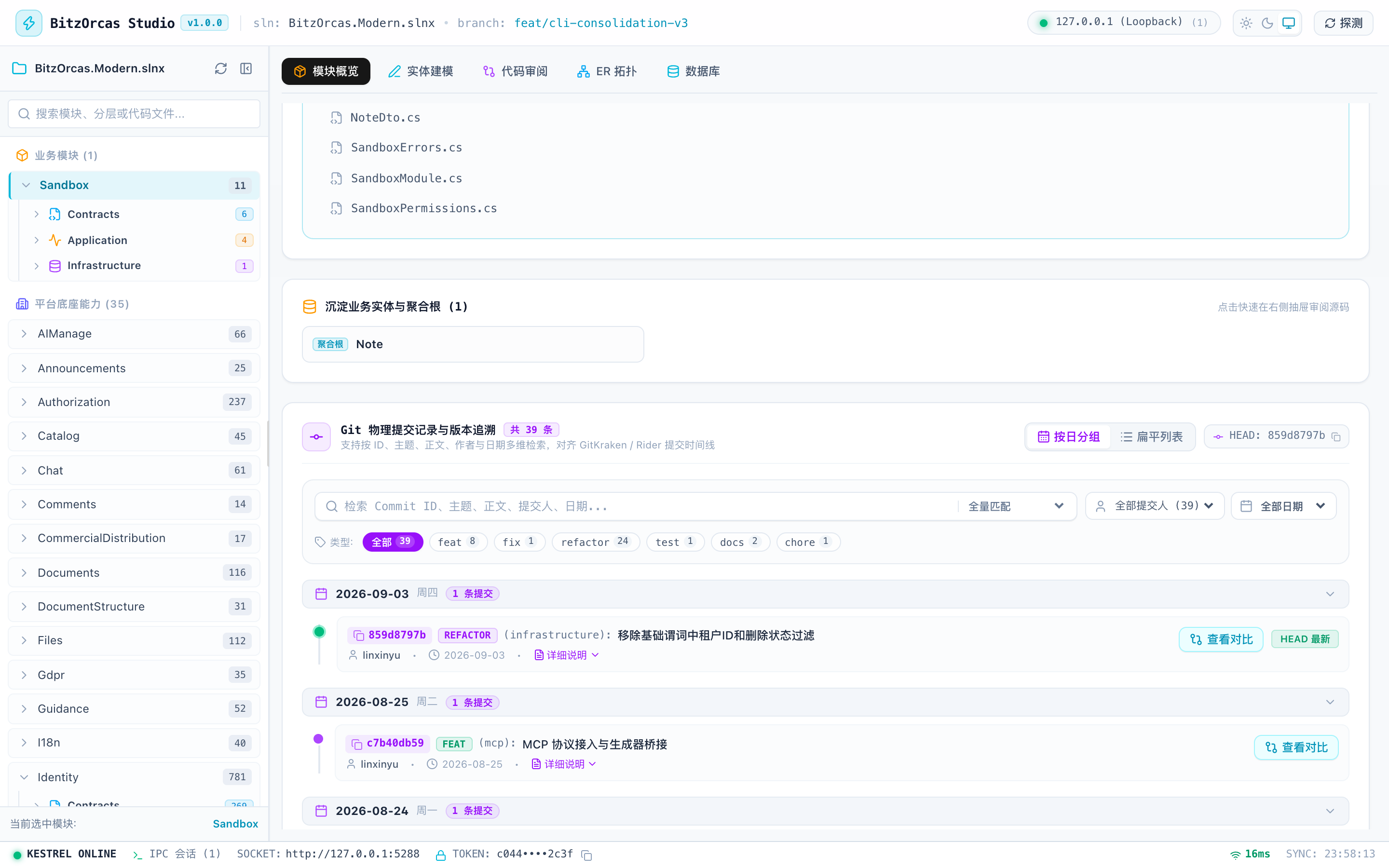
Search & Layout Dimensions
- 5 Search Dimensions: Full-text querying across “All”, “Commit ID”, “Subject”, “Body”, and “Author”;
- Conventional Commits Filtering: Classifies
feat,fix,refactor,test, andchoreprefixes into colored filter capsules; - Dual Timeline Views: Toggles between collapsible Date Grouping (Today, Yesterday, Specific Date) and compact flat list mode;
- One-Click Commit SHA Copy: Any commit hash capsule can be clicked to copy the full 40-character SHA.
6. Git Commit Diff Drawer
Clicking “View Diff” on any commit item slides out the full-screen commit diff drawer:
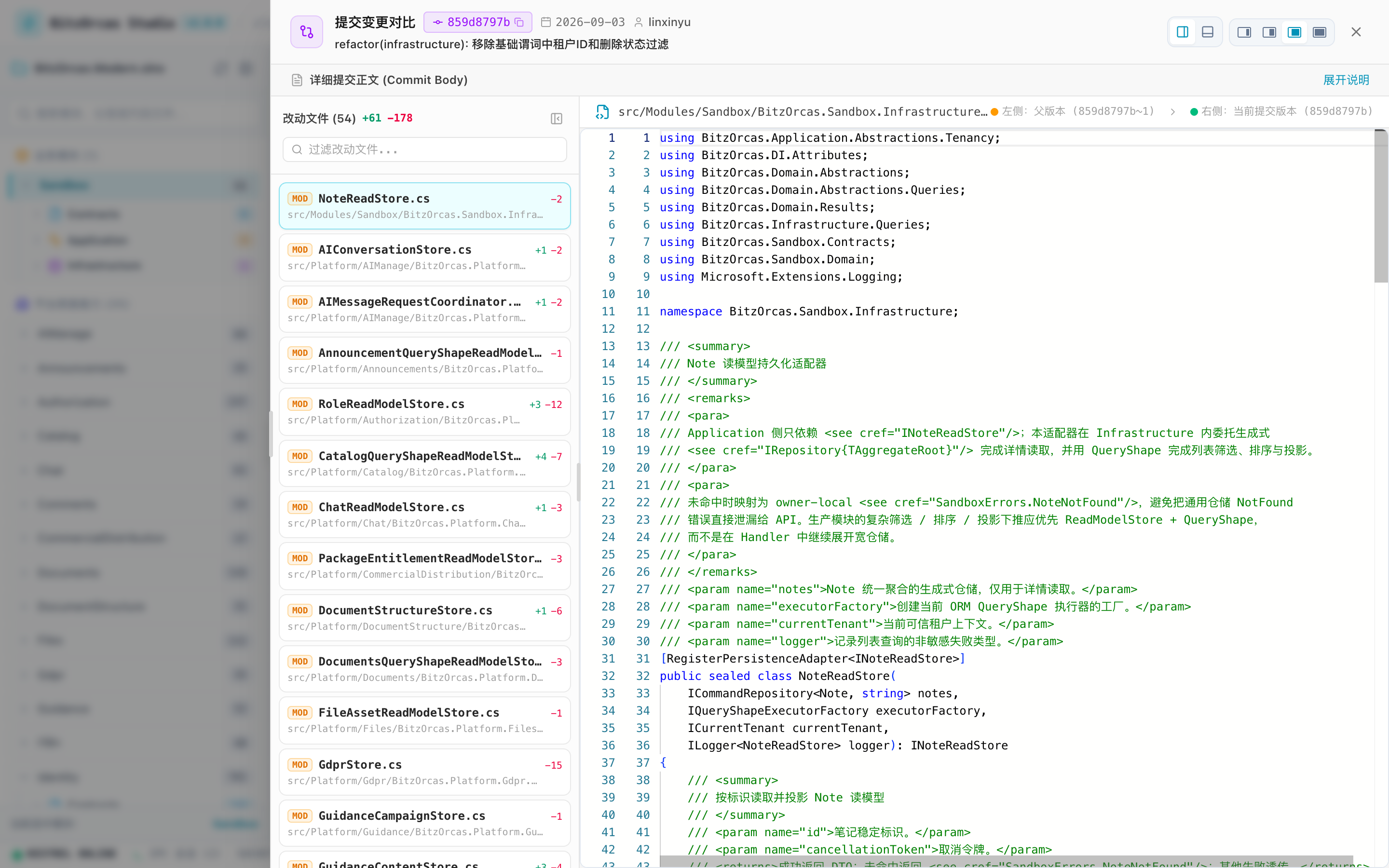
Drawer Architecture
- Root Portal Mount (
z-[100]): Mounted directly ontodocument.bodyvia ReactcreatePortal, bypassing ancestor Stacking Contexts and ensuring header tools are never occluded by the Studio Header; - Optimal Default Width (Second-Widest Preset): Initializes to the
'wide'preset (calc(100vw - 280px)), extending flush to the left solution explorer menu boundary for maximum diff visibility; - Collapsible File Rail:
- Folds into a 36px vertical semantic rail displaying change counts, freeing 100% of horizontal screen real estate for Monaco Diff;
- The right border handle allows smooth width adjustment between 200px and 600px.
7. File Inspector Drawer & Reverse Engineering
Selecting any source file in the solution explorer or module overview opens the inspector drawer:
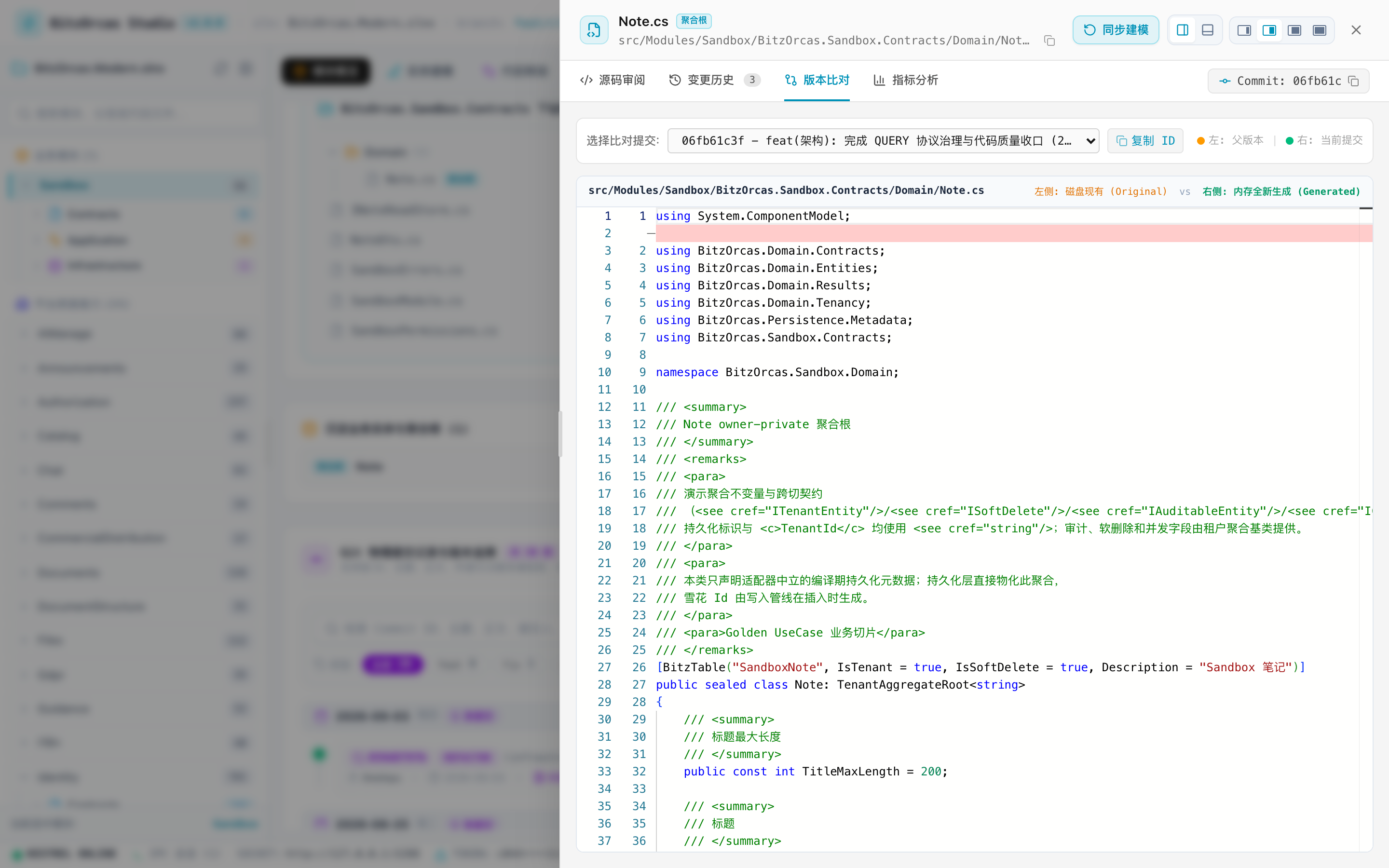
Specification Controls & Entity Badges
- BitzOrcas Design System 1.2 Window Controls (
OperationWindowControls):- Dock Switching: Seamlessly switches between right-side and bottom-docked modes;
- 4-Stage Scale Presets: Provides CSS-rendered miniature viewport icons supporting 25% (narrow), 45% (standard), 70% (wide), and 100% (full);
- Three-Tier Entity Classification Badges:
AggregateRoot(Cyan badge): Domain aggregate roots extendingTenantAggregateRoot<T>;Entity(Green badge): Dependent domain business entities extendingEntity<T>;PO(Purple badge): Persistence data models strictly located in the Persistence layer (*Po.cs);
- Roslyn C# Reverse Engineering: Inspecting an existing entity
.csfile and clicking “Sync to Designer” extracts properties, types, and annotations directly into the visual designer form.
Enterprise Domain Sample: LegalTech Matter Intake
Below is a real-world LegalTech business slice designed and generated via BitzOrcas Suite, following Clean Architecture and Unified Aggregate Root principles:
Domain Aggregate Root (MatterIntake.cs)
namespace BitzOrcas.LegalTech.Domain.MatterIntakes;
using System;using System.ComponentModel;using BitzOrcas.Domain.Entities;using BitzOrcas.Domain.Results;using BitzOrcas.Domain.Tenancy;using BitzOrcas.Persistence.Metadata;
/// <summary>/// Matter Intake Aggregate Root (serves as both persistence model and domain aggregate boundary)./// </summary>[BitzTable("LegalMatterIntake", IsTenant = true, IsSoftDelete = true, Description = "Matter intake aggregate root")]public sealed class MatterIntake : TenantAggregateRoot<string>{    /// <summary>    /// Unique matter reference code generated via Numbering platform capability    /// </summary>    [BitzColumn(Length = 64, IsRequired = true, Description = "Unique matter reference code")]    public string MatterCode { get; private set; } = string.Empty;
    /// <summary>    /// Legal matter title and client full legal name    /// </summary>    [BitzColumn(Length = 200, IsRequired = true, Description = "Client full legal name")]    public string ClientName { get; private set; } = string.Empty;
    /// <summary>    /// Estimated matter claim amount (strictly decimal(18,2))    /// </summary>    [BitzColumn(Precision = 18, Scale = 2, IsRequired = true, Description = "Estimated matter claim amount")]    public decimal EstimatedAmount { get; private set; }
    /// <summary>    /// Conflict of interest status (Cleared, PendingReview, ConflictBlocked)    /// </summary>    [BitzColumn(IsRequired = true, Description = "Conflict of interest check status")]    public ConflictCheckStatus ConflictStatus { get; private set; }
    /// <summary>    /// Parameterless constructor strictly reserved for ORM materialization    /// </summary>    [Obsolete("For ORM materialization only. Use Create factory method.", error: true)]    [EditorBrowsable(EditorBrowsableState.Never)]    public MatterIntake() : base("0") { }
    private MatterIntake(        string id,        string tenantId,        string matterCode,        string clientName,        decimal estimatedAmount) : base(id)    {        TenantId = tenantId;        MatterCode = matterCode;        ClientName = clientName;        EstimatedAmount = estimatedAmount;        ConflictStatus = ConflictCheckStatus.PendingReview;    }
    /// <summary>    /// Domain factory method enforcing business invariants upon creation.    /// </summary>    public static Result<MatterIntake> Create(        string? tenantId,        string? matterCode,        string? clientName,        decimal estimatedAmount)    {        if (string.IsNullOrWhiteSpace(tenantId) || !TenancyDefaults.IsValid(tenantId))        {            return Result<MatterIntake>.Failure(MatterIntakeErrors.TenantRequired);        }
        if (string.IsNullOrWhiteSpace(matterCode))        {            return Result<MatterIntake>.Failure(MatterIntakeErrors.MatterCodeRequired);        }
        if (string.IsNullOrWhiteSpace(clientName))        {            return Result<MatterIntake>.Failure(MatterIntakeErrors.ClientNameRequired);        }
        if (estimatedAmount < 0)        {            return Result<MatterIntake>.Failure(MatterIntakeErrors.EstimatedAmountInvalid);        }
        return Result<MatterIntake>.Success(new MatterIntake(            Guid.NewGuid().ToString("N"),            tenantId,            matterCode.Trim(),            clientName.Trim(),            estimatedAmount));    }}
/// <summary>/// Typed error catalog for matter intake/// </summary>public static class MatterIntakeErrors{    public static readonly Error TenantRequired = Error.Unauthorized("Legal.Matter.TenantRequired", "Tenant context missing or invalid.");    public static readonly Error MatterCodeRequired = Error.Validation("Legal.Matter.MatterCodeRequired", "Matter code cannot be empty.");    public static readonly Error ClientNameRequired = Error.Validation("Legal.Matter.ClientNameRequired", "Client name cannot be empty.");    public static readonly Error EstimatedAmountInvalid = Error.Validation("Legal.Matter.EstimatedAmountInvalid", "Estimated amount cannot be negative.");}
CLI Launch Commands & Modes Reference
Suite provides flexible CLI options for local development, scripted tasks, and remote environments:
| Command | Execution Mode | Recommended Use Case |
|---|---|---|
bitz suite | Interactive Prompt | Terminal displays a choice menu to launch the Web Studio or terminal TUI wizard. |
bitz suite --web | Direct Web Studio | Bypasses prompts, boots the embedded Kestrel server, and opens the system browser. |
bitz suite --web -p 5288 | Custom Port | Binds to a specific port (e.g. 5288) for parallel instances or when default ports conflict. |
bitz suite --headless -p 5288 | Headless Daemon | Runs the background HTTP & IPC server without opening a browser; ideal for containers and CI. |